ExtensionsAI toolsToken Counter
 Token Counter
Claude usage limit tracker for Chrome
Claude plans have a session limit and a weekly limit, but the chat does not show how close you are to either. Most people find out when a reply stops halfway or a warning appears in the middle of a task.
Add to Chrome — free (Token Counter)
Claude Code draws from the same limits, so a long session in the terminal can quietly use up the budget you meant for a document review in the browser.
Token Counter for Claude keeps those figures in view. It is an independent extension and is not affiliated with Anthropic.
What it does
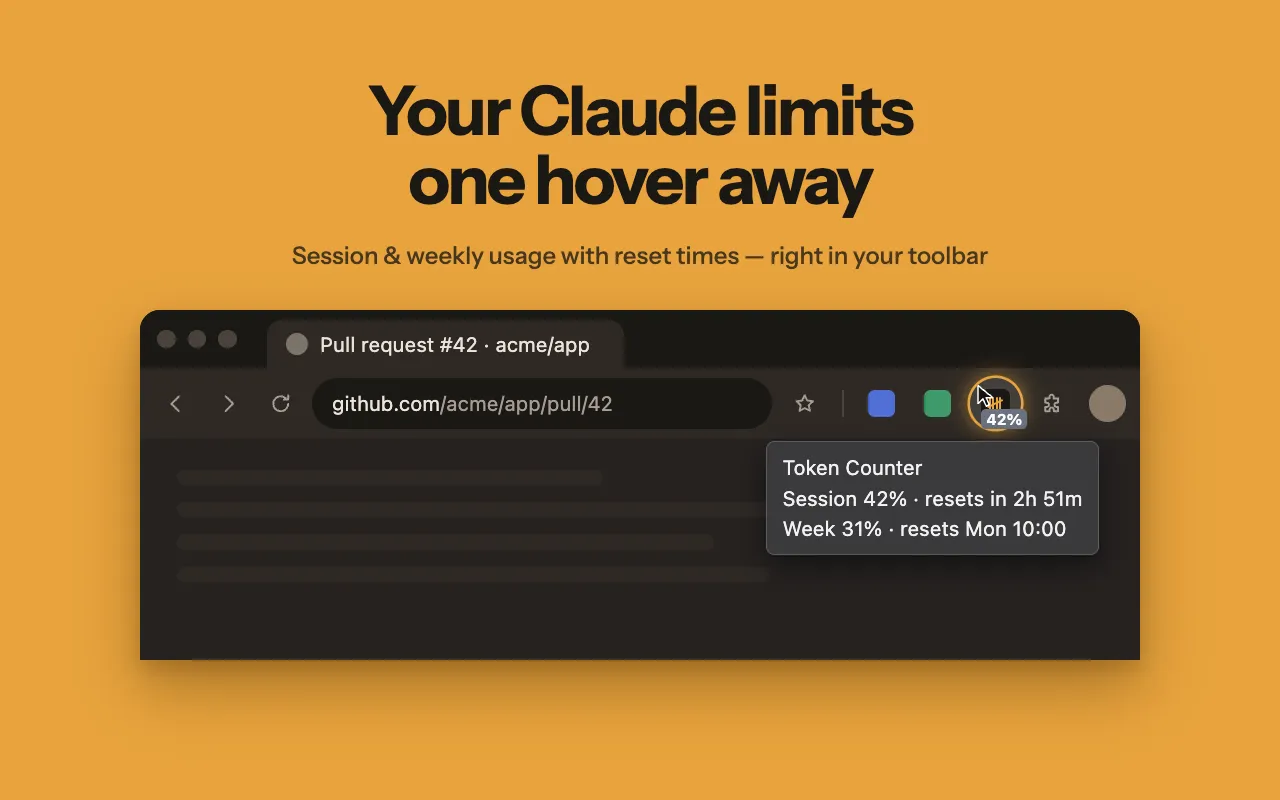
Token Counter for Claude shows how much of your session and weekly limit is used and when each one resets, from the toolbar or a bar under the chat.
- Current session and weekly usage as percentages, read from the same data as the Claude settings page
- Reset timer for the session and weekly limits, down to the minute
- Claude Code usage counted in the same figures, since it shares the session and weekly limits
- A bar under the claude.ai message box with session, weekly limit, model and effort
- Per-model weekly limits on Max plans, shown next to session usage
- Percentage on the toolbar icon, with a tooltip and a popup for both limits
How it works
- Install the extension and pin it to the Chrome toolbar.
- Open claude.ai while signed in. Usage is picked up automatically; there is no key to paste and nothing to set up.
- A slim bar appears under the message box with the current session, the weekly limit, the model and the effort setting. You can hide it when you do not need it.
- The toolbar icon carries a percentage. Hover over it, or open the popup, to see both limits and when each one resets.
Planning work around the reset
The reset time is often more useful than the percentage itself. A few habits that make use of it:
- Start a long document, a large code file or a batch of image uploads right after a reset, when the whole session budget is available.
- Near the end of a window, when little is left, switch to short questions that need short replies.
- Split a big job across two windows rather than losing an answer halfway through.
- Before leaving Claude Code on a long task, check the weekly figure as well as the session one.
Who it is for
- Developers who keep Claude Code busy through long refactoring sessions.
- Writers and researchers who work through large documents in the chat.
- Pro and Max subscribers who plan their biggest tasks for the start of a fresh window.
- Students and analysts who feed in long sources and want to check the remaining budget first.
What it can't do
- Built for Claude only; it does not track usage for other AI models or chat services.
- Needs you to be signed in to claude.ai in Chrome, because it reads usage through that session.
- Shows how much of your plan's limits is used, not a token count for a single prompt or file.
- Refreshes about once a minute while usage is changing and about every five minutes otherwise, not continuously.
Permissions and your data
Reads and changes pages on: claude.ai only.
https://claude.ai/*- Reads your usage limits from claude.ai through your existing signed-in session and draws the usage bar under the chat. It runs on no other site.
storage- Keeps your settings (plan, whether the bar is shown, which number the icon shows) and the latest usage percentages and reset times on your device.
alarms- Wakes the extension about once a minute so the number on the toolbar icon stays current and shows 0% exactly when a limit resets.
Questions
Does it count Claude Code usage?
How often do the numbers update?
Token Counter guides
- Claude Code usage limits: how the 5-hour and weekly limits work in the terminal
Claude Code shares your plan's 5-hour and weekly limits with claude.ai. What counts in the terminal, what drains them fastest and what happens at the limit.
· 7 min read - Claude usage credits (formerly extra usage): what they cost and how they work
Claude usage credits, formerly extra usage, keep you working past a 5-hour or weekly limit at API rates. What they cost and how to cap or turn them off.
· 7 min read - Claude Pro vs Max usage limits: how much more Max gives you
Pro is $20 a month; Max is $100 for 5x Pro's per-session usage or $200 for 20x. How session and weekly limits, Claude Code and Fable differ by plan.
· 7 min read - How to check how much Claude usage you have left
See your remaining Claude session and weekly usage in Settings > Usage, in Claude Code with /usage, or right under the chat box. Step-by-step guide.
· 6 min read - When does Claude's limit reset? 5-hour and weekly limits explained
Claude's session limit resets every five hours; the weekly limit resets at a fixed time set for your account. How to find your exact reset time.
· 6 min read
Try Token Counter
Free. Remove it any time from the Chrome toolbar.