 Token Counter
- On Pro, Max and Team plans, Claude Code draws on the same 5-hour and weekly limits as claude.ai, and each request counts against both at once.
- Long sessions drain the limit because every request resends the whole conversation. Opus, subagents and agent teams add more.
- At a limit, Claude Code can wait and continue after the reset. With an API key there are no plan limits, only per-token billing plus rate and spend limits.
On this page
On Pro and Max plans, Claude Code draws on the same five-hour session limit and weekly limit as claude.ai. The Pro and Max article says “all activity in both tools counts against the same limits.” Team plans and seat-based Enterprise work the same way, and each request counts against both windows at once.
Anthropic publishes no number of hours, prompts or tokens for any plan, and the pricing page says “there’s no fixed message count”. The Free plan doesn’t include Claude Code.
With an API key, there are no plan limits. You pay per token, within the API’s rate limits and spend limits.
Which limits apply depends on how you signed in
Anthropic’s Claude Code limits article ties the meter to how you signed in. Find your row in the table.
| Signed in with | What limits you | Source |
|---|---|---|
| Pro or Max | Session and weekly limits shared with chat and IDEs; Max adds a Fable cap of up to 50% of the weekly limit | Pro and Max article, Fable article |
| Team or seat-based Enterprise | A per-seat allowance on a rolling five-hour window and a weekly window, shared with chat and Cowork; its size depends on the Standard or Premium seat | Costs guide |
| Usage-based Enterprise | “no per-seat usage limits”; usage is billed at API rates | Team and Enterprise article |
| API key (Console, Bedrock, Vertex, Foundry) | Per-token billing, with rate limits and a monthly spend cap set by usage tier on the Console, or your cloud provider’s limits | Limits article, rate limits docs |
claude -p and the Agent SDK draw on your plan limits when you’re signed in with a subscription. With an API key from a Console organization linked to a Max or Team plan, they spend that plan’s monthly API credits.
One catch from the Pro and Max article: if ANTHROPIC_API_KEY is set in your environment, Claude Code uses that key instead of your subscription, and you pay API charges.
One pool, two windows at the same time
In Claude Code’s errors reference, Anthropic’s example is a large workflow fanout: one burst “can exhaust the weekly allowance before the session window resets.” Once the weekly limit is spent, you wait for its reset, not the next five-hour window.
Switching models helps only with some limits. The errors reference says “the session and weekly limits are shared across all models, so switching models doesn’t restore access.” One older page disagrees: the limits article tells Enterprise seat users at a limit that they “can switch to a lighter model with /model”. Separate Opus and Sonnet limits apply only to their own model family, so switching to another family with /model keeps you working. Anthropic doesn’t say which plans have them.
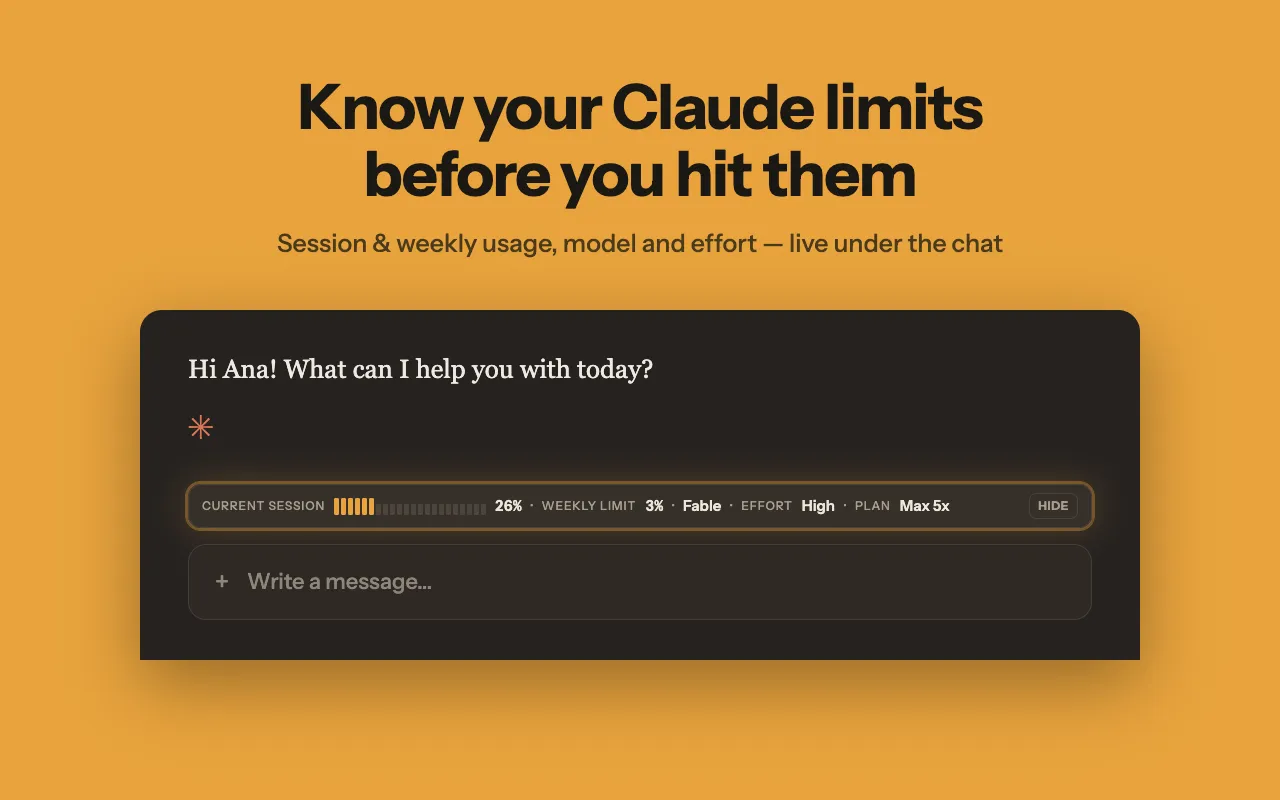
If you work in both the terminal and the browser, the combined figure is what matters. Token Counter, our Chrome extension, shows session and weekly usage as percentages in a bar under the claude.ai message box and on its toolbar icon, with the time until each limit resets. Claude Code usage is already in those figures, because the extension reads the same claude.ai usage data as the Claude settings page. We suggest it for Pro and Max only, as it is not verified on the Free plan. Its only site access is claude.ai, so it doesn’t read your terminal or the Claude Code CLI. It shows plan totals. For a split by skill, subagent, plugin or MCP server, use /usage in Claude Code. It doesn’t show API-key, Console, Bedrock or Vertex usage, which isn’t plan usage. The extension needs you signed in to claude.ai in Chrome. It refreshes about once a minute while usage is changing and about every five minutes otherwise, so a sudden burst shows up late. It never pauses or stops Claude Code.
What uses up the limit fastest in Claude Code
Anthropic’s costs guide, limits article and errors reference name six main drains:
- The conversation is resent every time. A one-line question late in an all-day session “still draws usage for the whole conversation.” Run
/clearwhen you switch tasks (“the single most effective lever for both quality and cost”) and/compactwhen you are mid-task. - Cache misses. After a break longer than the cache lifetime (an hour on a subscription), your next message reprocesses your full context. Switching models does the same, because each model keeps its own prompt cache.
- Subagents and agent teams. Each subagent sends its own requests on top of the main conversation, and agent teams “use approximately 7x more tokens than standard sessions when teammates run in plan mode”.
- Opus and thinking. Opus “uses meaningfully more of your quota”. To spend less,
/model opusplanuses Opus for planning and Sonnet for execution. Thinking tokens bill as output tokens and can’t be turned off on Opus 5.5, Sonnet 5.5, Haiku 5.5 or Fable. Lower/effortinstead. @mentions. The@prefix pulls in the whole file plus its CLAUDE.md tree. A bare path saves tokens.- Idle time. Goal check-ins and scheduled tasks send your full context while you’re away, and background jobs cost “typically under $0.04 per session”.
On a paid plan, /usage “flags behaviors that account for 10% or more of your recent usage”. The usage walkthrough covers the rest of that screen.
What Claude Code does when you hit a limit
Before the limit, you may get a warning like the first line below. At the limit, Claude Code blocks new requests until the reset time in the message. The errors reference lists the wording:
You've used 85% of your session limit · resets 3:45pm
You've hit your session limit · resets 3:45pm
You've hit your weekly limit · resets Mon 12:00am
You've hit your Opus limit · resets 3:45pm
You've hit your Sonnet limit · resets 3:45pm
If you hit the session limit mid-response, Claude Code may finish the current step. The wrap-up article says this wrap-up doesn’t apply with an API key, and the guide on when limits reset covers it.
Automatic continue. By default, Claude Code waits in the open session and picks the task up where it stopped once the limit resets. The interactive mode docs limit this to interactive sessions with a claude.ai login, on v2.1.234 or later.
- It doesn’t resend your last message.
- It still asks for permissions as usual, and it re-arms the wait at most twice in a row.
- It won’t start the wait on its own for a reset more than 24 hours away, as a weekly one can be. You can still start it from the usage-limit menu,
/rate-limit-options.-pruns, background sessions and API keys get no wait. - To turn it off, switch off “Continue automatically at usage limit” in
/config, or setautoContinueAtUsageLimittofalse.
Other options. Wait for the reset, run /usage-credits to continue at API rates (see the usage credits guide), or upgrade: the Pro vs Max comparison shows how much more each plan gives.
Errors that look like a limit but aren’t
These four are not plan limits:
Server is temporarily limiting requests (not your usage limit): a short-lived throttle unrelated to your plan quota, retried automatically since v2.1.199.Request rejected (429): the rate limit set for your API key, Amazon Bedrock project or Google Cloud project. A strayANTHROPIC_API_KEYcan route you through a low-tier key. Check the active credential with/status.Usage credits required for 1M context: an entitlement check, not an exhausted quota.- A full context window is different from a usage limit.
/compactor/clearfixes it.
How Claude Code’s limits changed in 2026
As of October 2026:
- May 6, 2026. Anthropic’s May 6 announcement said it was “doubling Claude Code’s five-hour rate limits for Pro, Max, Team, and seat-based Enterprise plans” and removing the peak-hours reduction on Claude Code for Pro and Max. The help pages still describe one pool for chat and Claude Code and don’t explain how a doubled Claude Code limit fits inside it.
- June 15, 2026. The Agent SDK article says planned changes to Agent SDK usage were paused, so
claude -pand the SDK still draw on your subscription limits. - September 22, 2026. The Opus 5.5 announcement said Anthropic was “increasing five-hour usage limits on Pro, Max, Team, and seat-based Enterprise plans,” with no figures. It also gave subscription users a rate limit reset they can save and use whenever they choose.
- October 7, 2026. An update to the same Agent SDK article says Max and Team plans now include monthly API credits for
claude -pand the SDK. Interactive Claude Code can’t use them.
Some sites still quote limits as hours per week. Those figures are not on Anthropic’s current plan pages.
Token Counter is an independent extension and is not affiliated with Anthropic.