 SQLite Explorer
- SQLite has no DESCRIBE. In the sqlite3 shell, .schema orders prints the table's CREATE statement, plus its indexes and triggers.
- PRAGMA table_info(orders) returns one row per column: name, type, NOT NULL, default and primary key position. Generated columns need table_xinfo.
- A mistyped table or pragma name gives an empty result, not an error. Check the exact table name with .tables before you trust an empty answer.
On this page
- Show the CREATE statement with .schema
- List the columns with PRAGMA table_info
- How table_info maps to MySQL’s DESCRIBE
- Generated columns: use table_xinfo
- Get the CREATE statement with a SQL query
- Column lists in code with pragma_table_info()
- When the schema comes back empty
- See the schema without the command line
Type DESCRIBE orders; into stock sqlite3 3.53.0 or 3.54.1 and you get a syntax error: SQLite has no DESCRIBE. For the table as written, run .schema orders in the shell. For one row per column, generated ones aside, run PRAGMA table_info(orders); in any SQL client.
Neither shows everything: table_info does not list indexes or foreign keys, and .schema gives SQL text to read, not fields. The shell examples below ran in both versions on a test file, shop.db, with tables customers, orders and order_items.
Show the CREATE statement with .schema
With a table name, .schema limits its output to that table (sqlite3 CLI docs). For orders:
CREATE TABLE orders (
  id INTEGER PRIMARY KEY AUTOINCREMENT,
  customer_id INTEGER NOT NULL REFERENCES customers(id), -- who placed it
  total REAL,
  created_at TEXT DEFAULT CURRENT_TIMESTAMP,
  total_cents INTEGER GENERATED ALWAYS AS (CAST(total * 100 AS INTEGER)) VIRTUAL
);
CREATE INDEX idx_orders_customer ON orders(customer_id);
CREATE TRIGGER orders_no_negative BEFORE INSERT ON orders WHEN NEW.total < 0 BEGIN SELECT RAISE(ABORT, 'negative total'); END;
That is the statement as typed, comment included, plus the table’s index and trigger. With no argument, .schema prints the schema of the whole database, the internal sqlite_sequence table included. The --nosys flag (3.34.0+) hides that table.
The argument is a pattern: the usage message in 3.53.0 and 3.54.1 reads .schema ?--indent? ?--nosys? ?LIKE-PATTERN?. Matching ignores case, so .schema ORDERS works, .schema order prints nothing, and .schema order% prints orders and order_items.
The sqlitetutorial.net guide warns that .schema orders; with a trailing semicolon prints nothing. Since 3.53.0, per the SQLite changelog, “Bare (unquoted) semicolons at the end of dot-commands are silently ignored.” On an older shell, leave the semicolon off.
List the columns with PRAGMA table_info
From the command line, 3.53.0 and 3.54.1 print:
$ sqlite3 shop.db "PRAGMA table_info(orders);"
0|id|INTEGER|0||1
1|customer_id|INTEGER|1||0
2|total|REAL|0||0
3|created_at|TEXT|0|CURRENT_TIMESTAMP|0
The pragma documentation says it “returns one row for each normal column in the named table”. The fields:
cid: a row counter, not the column’s position. A generated column earlier in the table is skipped.nameandtype. The type is empty if none was declared.notnull: 1 for NOT NULL.dflt_value: the default as SQL, soDEFAULT 'n/a'shows as'n/a'.pk: “either zero for columns that are not part of the primary key, or the 1-based index of the column within the primary key”. WithPRIMARY KEY(order_id, line), order_id shows 1 and line shows 2, so pk is a yes/no flag only for one-column keys.
The pragma also accepts a view. The same changelog notes that since 3.53.0, interactive sessions draw the rows in a box, while batch output keeps the old format. .mode column is optional and only changes the layout.
How table_info maps to MySQL’s DESCRIBE
The MySQL manual says “DESCRIBE is a shortcut for SHOW COLUMNS”, which prints six fields per column. In SQLite:
| MySQL DESCRIBE | SQLite |
|---|---|
| Field | name in table_info |
| Type | type |
| Null | notnull, inverted: 1 means NOT NULL, MySQL’s NO |
| Key | pk for PRI; PRAGMA index_list for UNI and MUL |
| Default | dflt_value |
| Extra | The CREATE text, such as AUTOINCREMENT; hidden in table_xinfo for generated columns |
PRAGMA index_list(customers); returns one row per index, with an origin of c (CREATE INDEX), u (UNIQUE) or pk. The UNIQUE constraint on email creates sqlite_autoindex_customers_1, origin u, and PRAGMA index_info on that index names the column. For REFERENCES clauses, PRAGMA foreign_key_list(orders); returns one row per foreign key column, so a two-column key gives two rows.
Generated columns: use table_xinfo
The orders table has five columns, but table_info listed four. The generated columns page says “Generated columns are not included in the list of columns provided by the PRAGMA table_info statement”, unlike the newer table_xinfo:
$ sqlite3 -header shop.db "PRAGMA table_xinfo(orders);"
cid|name|type|notnull|dflt_value|pk|hidden
0|id|INTEGER|0||1|0
1|customer_id|INTEGER|1||0|0
2|total|REAL|0||0|0
3|created_at|TEXT|0|CURRENT_TIMESTAMP|0|0
4|total_cents|INTEGER|0||0|2
Per the pragma page, hidden is 2 or 3 for a generated column, 1 for a hidden column in a virtual table and 0 otherwise. table_xinfo arrived in SQLite 3.26.0 (release log), before generated columns in 3.31.0.
Get the CREATE statement with a SQL query
Outside the shell, query the schema table. Filtering by name returns the CREATE TABLE alone:
SELECT sql FROM sqlite_schema WHERE name = 'orders';Filter by tbl_name to get the index and trigger too. The schema table page says “for an index, the tbl_name is the name of the table that is indexed”, and for a trigger, the table that fires it:
SELECT type, name, sql FROM sqlite_schema WHERE tbl_name = 'orders';This returns the table, its index and its trigger, but not the big_orders view built on orders. sqlite_master, the older name, returns the same rows and is the one that works before 3.33.0.
Per the schema table page, indexes created automatically for UNIQUE and PRIMARY KEY constraints have NULL in the sql column, so .schema never shows them.
The same page says the text is kept “as modified by subsequent ALTER TABLE statements”, and comments survive. After ALTER TABLE customers ADD COLUMN phone TEXT;, the customers statement ends with , phone TEXT) on a line of its own. The ALTER TABLE page explains why: the command “works by modifying the SQL text”.
Column lists in code with pragma_table_info()
The pragma page says “PRAGMAs that return results and that have no side-effects can be accessed from ordinary SELECT statements as table-valued functions”. Since 3.16.0, SELECT name, type FROM pragma_table_info('orders'); works like a table. Joined with the schema table, it lists every column of every table:
SELECT m.name AS table_name, p.name AS column_name, p.type
FROM sqlite_schema AS m
JOIN pragma_table_info(m.name) AS p
WHERE m.type = 'table' AND m.name NOT LIKE 'sqlite_%'
ORDER BY m.name, p.cid;
It returns 12 rows here. Without NOT LIKE, sqlite_sequence adds two. total_cents is missing again, and pragma_table_xinfo adds it as a 13th row.
The Python sqlite3 docs say to “use a placeholder in the string” for values, but the PRAGMA form takes none. With Python 3.11 and SQLite 3.53.0, con.execute("PRAGMA table_info(?)", ("orders",)) raises OperationalError: near "?": syntax error. The function form works:
con = sqlite3.connect("file:shop.db?mode=ro", uri=True)  # read-only
con.execute("SELECT name, type FROM pragma_table_info(?)", ("orders",)).fetchall()
# [('id', 'INTEGER'), ('customer_id', 'INTEGER'), ('total', 'REAL'), ('created_at', 'TEXT')]
For a list with generated columns, read cursor.description after SELECT * FROM orders LIMIT 0. It is set “for SELECT statements without any matching rows as well” and lists all five.
When the schema comes back empty
The table name is wrong. For a missing table, .schema, PRAGMA table_info and pragma_table_info() print nothing and exit with status 0 from the command line in 3.53.0 and 3.54.1. In an interactive 3.54 session, the pragma forms draw a header with no rows, a 3.54.0 change in the changelog.
The pragma name is misspelled. PRAGMA tabel_info(orders); returns nothing too. The pragma page says: “No error messages are generated if an unknown pragma is issued. Unknown pragmas are simply ignored.”
The pattern does not match. .schema order is not a prefix search: add %. Before 3.53.0, also drop the trailing semicolon.
To check the exact name, list the tables with .tables. If that is empty too, the guide explains how a mistyped path creates an empty database.
See the schema without the command line
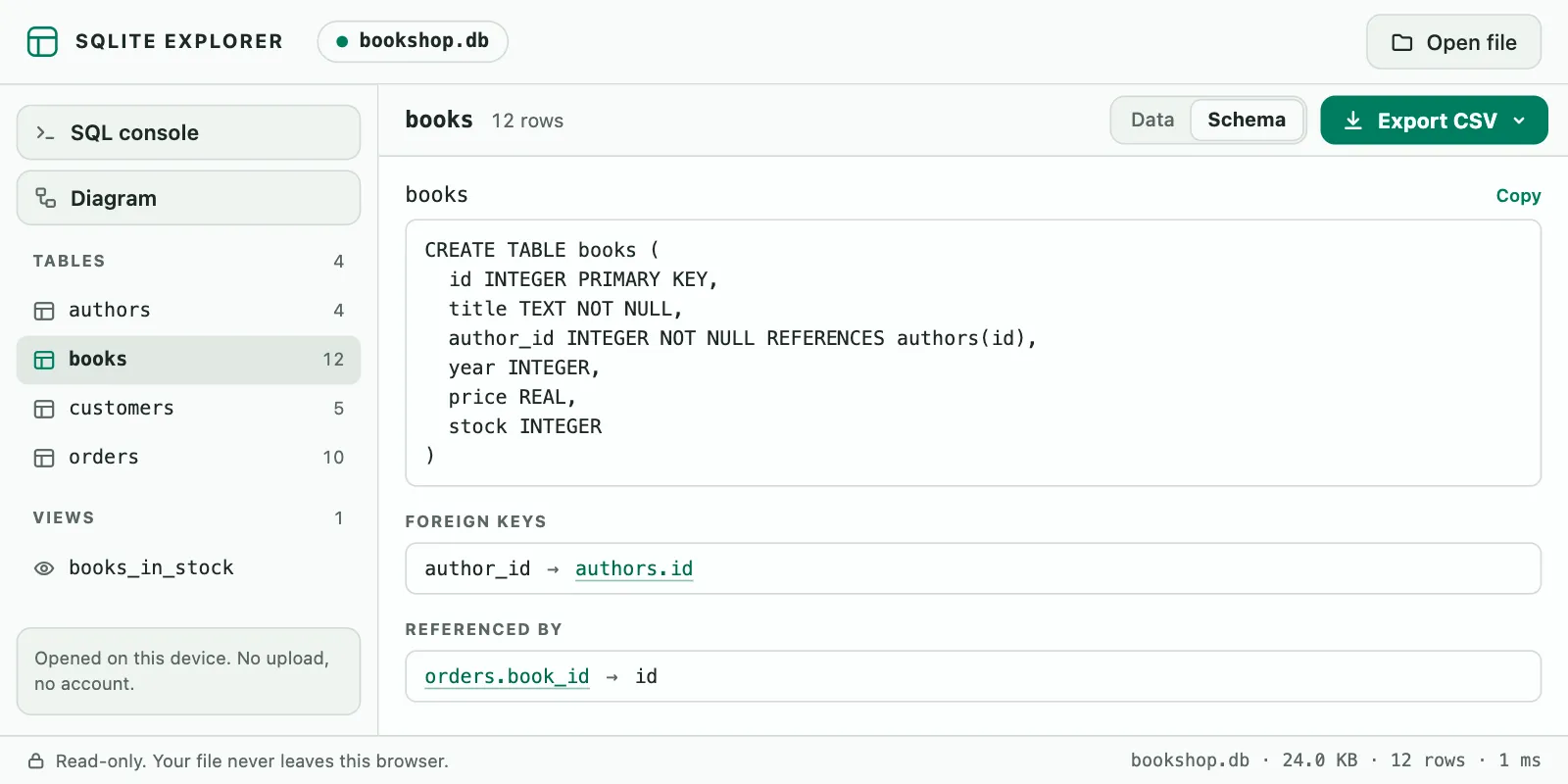
To look at one file without a terminal, SQLite Explorer, our Chrome extension, opens it in a browser tab: press Alt+Shift+D and drop a .db, .sqlite3 or .db3 file on that tab. Its Schema tab shows the CREATE statements, indexes and triggers, plus a diagram of declared relations. The file is read into the tab’s memory and is not uploaded. Its limits: it is read-only. It reads SQLite files only, not MySQL or PostgreSQL servers or .sql dumps, and it cannot open encrypted databases (SQLCipher, SEE). Files larger than 1 GB are not supported, and diagram lines appear only for relations declared in the file.
SQLite Explorer is an independent extension and is not affiliated with the SQLite project.