 SQLite Explorer
- In the sqlite3 shell, type .tables. It lists tables and views from every attached database and hides SQLite's internal sqlite_ tables.
- In SQL or from Python, run SELECT name FROM sqlite_schema WHERE type='table'. sqlite_master is the older name of the same table and still works.
- An empty list with no error can mean a mistyped path (sqlite3 then creates a new, empty file) or, in current sqlite3, a file that is not SQLite.
On this page
- List tables in the sqlite3 shell with .tables
- List tables with a SQL query
- Why the shell and the query return different lists
- sqlite_schema and sqlite_master are the same table
- Tables in attached and temporary databases
- List tables from Python
- When the list comes back empty
- See the tables without the command line
To list the tables in a SQLite database, open the file in the sqlite3 shell and type .tables. In SQL, from Python or any other client, run the query the SQLite FAQ gives: SELECT name FROM sqlite_schema WHERE type='table' ORDER BY name;.
The two lists are not the same: .tables includes views and hides SQLite’s internal tables, while the query does the opposite. And if either comes back empty without an error, check the file path first. sqlite3 creates a missing file instead of reporting it.
List tables in the sqlite3 shell with .tables
Start the shell with your database file as its argument (replace ex1.db with your path), then type the command the sqlite3 CLI docs give for listing tables:
sqlite3 ex1.db
.tables
If you start sqlite3 by double-clicking it on Windows, it opens without your file. Open your file from inside the shell first:
.open ex1.db
.tables
.tables also takes an optional pattern. Its help line, .tables ?TABLE?, reads “List names of tables matching LIKE pattern TABLE”.
List tables with a SQL query
.tables belongs to the sqlite3 shell. In a script, an app or a GUI that runs SQL, query the schema table instead. This is the FAQ’s version:
SELECT name FROM sqlite_schema WHERE type='table' ORDER BY name;Every SQLite database stores its own schema in sqlite_schema. Virtual tables are included, because the ‘table’ string is used for both ordinary and virtual tables.
Keep the single quotes. A 2008 Stack Overflow answer writes type = "table", which runs in many tools only because SQLite treats a double-quoted string as a string literal when it matches no valid identifier. The SQLite quirks page calls this a misfeature: “a misspelled double-quoted identifier will be interpreted as a string literal, rather than generating an error.” Since SQLite 3.41.0 the sqlite3 shell rejects it by default with “no such column”, though macOS’s bundled 3.51.0 still accepts it.
Why the shell and the query return different lists
The CLI docs say .tables is similar to setting list mode and running this query:
SELECT name FROM sqlite_schema WHERE type IN ('table','view') AND name NOT LIKE 'sqlite_%' ORDER BY 1;So it adds views and drops every name that starts with sqlite_. A third option, PRAGMA table_list;, shows everything. Take a test file with an AUTOINCREMENT table and a view, big_orders. In sqlite3 3.54.1, .tables prints:
big_orders customers ordersThe FAQ query on the same file returns customers, orders and sqlite_sequence: no view, plus an internal table. Across the three methods:
| Method | Views | Internal sqlite_ tables | Attached and temp databases |
|---|---|---|---|
.tables |
Shown | Hidden | Shown, with a prefix such as temp. |
| FAQ query | Not shown | Shown | Main database only |
PRAGMA table_list; |
Shown, typed as view | Shown | Shown, with a schema column |
The file format docs say any table whose name begins with “sqlite_” is an internal schema object. Two you may see: sqlite_sequence, “created automatically whenever any ordinary table with an AUTOINCREMENT integer primary key is created”, and the sqlite_statN tables, which store statistics gathered by the ANALYZE command.
PRAGMA table_list; returns one row per table or view, with a type of “table”, “view”, “shadow” or “virtual”, and covers all schemas by default. The table_list pragma first appeared in SQLite 3.37.0 (2021-11-27), so on an older build use the query. In our test it also listed the schema tables themselves, sqlite_schema and sqlite_temp_schema.
A DB Pro guide says .tables does not show views. The output above shows one, big_orders.
sqlite_schema and sqlite_master are the same table
Older answers, and the tutorial in the Python docs, query sqlite_master, which is the same table. The schema table page says it “can always be referenced using the name ‘sqlite_schema’”, and that “for historical compatibility, some alternative names are also recognized, including: sqlite_master”. sqlite_master works anywhere; sqlite_temp_schema and sqlite_temp_master only work for the temp database. Swap sqlite_master into the FAQ query and the output is identical.
The SQLite pages and release notes we checked do not say which version introduced sqlite_schema. If an older tool rejects it, use sqlite_master.
Tables in attached and temporary databases
One connection can hold several databases. The .databases command lists them: main is the file you opened, and temp, used for temporary tables, appeared in our test only after we created one. A file added with ATTACH DATABASE joins the list.
.tables covers all of them: in our test it printed an attached table as other.logs and a temporary one as temp.scratch. The accepted answer to a 2008 Stack Overflow question says .tables does not look into attached databases; the current CLI docs say it queries “all attached databases, not just the primary database”.
In SQL, each database has its own schema table, qualified by name, such as main.sqlite_schema or temp.sqlite_schema. The FAQ notes that “Temporary tables do not appear in the SQLITE_SCHEMA table” and gives this query for both kinds (in the shell, add a semicolon at the end):
SELECT name FROM (SELECT * FROM sqlite_schema UNION ALL SELECT * FROM sqlite_temp_schema) WHERE type='table' ORDER BY nameList tables from Python
Python’s sqlite3 module runs the same SQL. Here is the FAQ query in the setup the Python sqlite3 docs use, at the interactive prompt:
>>> import sqlite3
>>> con = sqlite3.connect("tutorial.db")
>>> cur = con.cursor()
>>> res = cur.execute("SELECT name FROM sqlite_schema WHERE type='table' ORDER BY name;")
>>> res.fetchall()
For the test file above, the last line returns [('customers',), ('orders',), ('sqlite_sequence',)], one tuple per table.
The catch is in the second line: sqlite3.connect() opens the file, “implicitly creating it if it does not exist”, so a typo in the path gives you a new empty database and an empty list. To make a wrong path fail instead, open the file read-only, as the same docs show:
>>> con = sqlite3.connect("file:tutorial.db?mode=ro", uri=True)On a missing file, that line raises OperationalError: unable to open database file and creates nothing.
Python’s SQLite library can differ from your shell’s: sqlite3.sqlite_version shows the one Python uses, and PRAGMA table_list; needs 3.37.0 or later.
When the list comes back empty
Three things can leave the list empty.
The path is wrong. “If the named file does not exist, a new database file with the given name will be created automatically,” the CLI docs say, and Python’s connect() does the same. Run .tables on a misspelled file name and it prints nothing, exits with status 0 and leaves a 0-byte file behind. Check the path and delete the stray empty file.
The tables live in another database. Attached and temporary tables do not show up in the FAQ query. Run .databases to see what is open, then use .tables or PRAGMA table_list;.
The file is not a SQLite database. SQLite cannot read a file that is not SQLite at all, or is encrypted. Stock sqlite3 3.53.0 and 3.54.1 print nothing for .tables on such a file and exit with status 0, while the FAQ query reports that the file is not a database. macOS’s bundled 3.51.0 reports the error for .tables too. The SQLite result codes call this SQLITE_NOTADB: the file “does not appear to be an SQLite database file”.
The SEE documentation says an encrypted file opened with a wrong key gives the same SQLITE_NOTADB error, with the message “file is encrypted or is not a database”. Our guide to .db files explains what else such a file can be.
See the tables without the command line
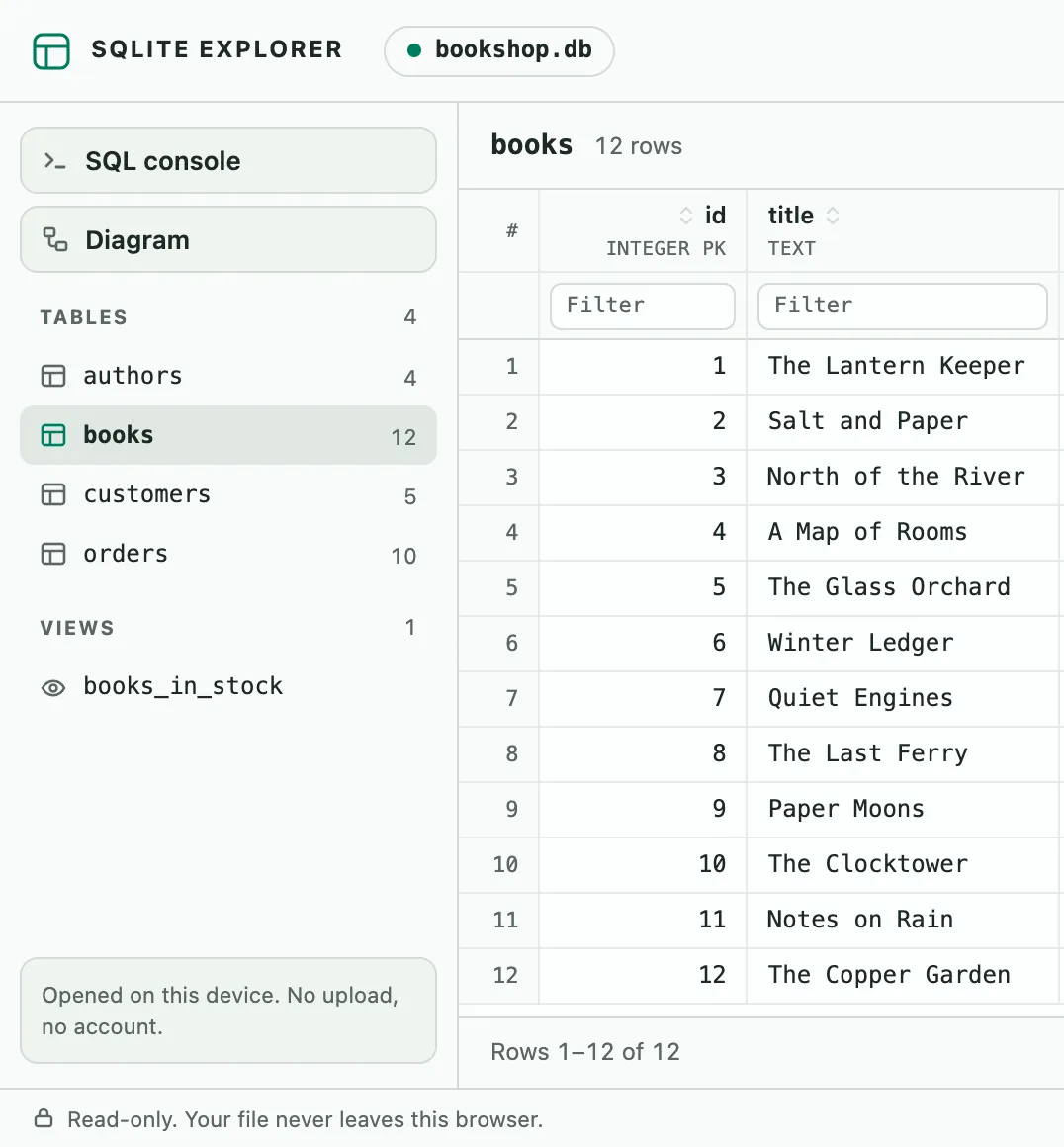
For a quick look at one file without a terminal, SQLite Explorer, our Chrome extension, opens it in a browser tab. Drop a .db, .sqlite3 or .db3 file on its tab, and the left panel lists the tables, each with its row count, and the views. A read-only SQL console runs a query on Ctrl+Enter. The file is read into the memory of that tab and is not uploaded. Its limits: it reads SQLite files only, not MySQL or PostgreSQL servers or .sql dumps. It cannot open encrypted databases (SQLCipher, SEE). It is read-only, so you can view and export data but not edit it. Files larger than 1 GB are not supported, and if a database is in WAL mode, it warns that recent changes may be missing.
To try this guide’s commands without installing anything, recent versions of the CLI run in a browser tab at sqlite.org/fiddle, though the CLI docs warn that “not all features of the CLI are available” there.
SQLite Explorer is an independent extension and is not affiliated with the SQLite project.