 Python Runner
- Pyodide is the CPython interpreter compiled to WebAssembly, so Python can run in a browser tab or in Node.js.
- Most of the standard library works. Threading, multiprocessing and sockets do not, tkinter and turtle are removed, and the file system is wiped on reload.
- Pyodide itself can install pure-Python packages with micropip, but a tool built on it may ship none: check before you rely on a package.
On this page
Pyodide is the standard Python interpreter, CPython, compiled to WebAssembly: the same Python, built so that it runs inside a browser tab or in Node.js, with no Python installed on your machine. You rarely meet it on its own. It is the engine inside online runners, notebooks and browser tools, and some of them say so on the label: “runs on Pyodide”. Here is what that means for your code: the standard library mostly works, threads and network sockets do not, files live in memory and vanish on reload, and whether a package such as numpy works depends on the tool you are using, not on Pyodide itself.
What Pyodide is
Pyodide’s about page calls it “a Python distribution for the browser and Node.js based on WebAssembly/Emscripten”. The Python inside is not a lookalike or a subset: it is CPython, the interpreter you would otherwise download from python.org, compiled with Emscripten into WebAssembly. The project was created in 2018 by Michael Droettboom at Mozilla as part of Iodide, an experimental web notebook, and is now an independent, community-driven open-source project.
Releases keep coming: the changelog lists 314.0.7, released on 14 September 2026, as the newest release at the time of writing, and the 314 line moved to Python 3.14.2 with 314.0.0 in June 2026. So “runs on Pyodide” means a real, current CPython. The version number is still worth checking in any tool, and the section at the end shows how.
Before your first line of Python runs, the tool has to fetch the interpreter and the standard library, so the first load takes a pause. Microsoft’s 2021 evaluation measured 6.4 MB for the CPython standard library alone and 172.955 MB for the full distribution with its then-75 pre-installed packages; those numbers are five years old, so read them as “megabytes, not kilobytes”, not as current sizes. On speed, the same post only says its demo showed strong performance, and the official docs publish no benchmark, so this guide quotes none.
What runs, and what doesn’t
Most of the Python standard library works. The compatibility page puts it plainly: “Most of the Python standard library is functional”. It also notes that a large part of the CPython test suite passes. For you this means the modules Python courses live on (math, json, re, datetime, itertools, collections, csv, random) are there, with the exceptions below.
Some modules are removed outright, to shrink the download and because they cannot work in a WebAssembly virtual machine: tkinter, turtle, venv, ensurepip, curses, dbm, termios, among others. A script that imports one of them fails at the import line.
Three familiar modules import fine and then refuse to work: threading, multiprocessing and sockets are, in the compatibility page’s words, “not functional due to the limitations of the WebAssembly VM”. Code that starts threads or processes fails at run time, and packages built on them will not run either.
A few modules are present but reduced:
- ssl is a stub without OpenSSL; the parts that depend on it raise
NotImplementedError. - hashlib is missing the hash algorithms that depend on OpenSSL.
- decimal keeps its C implementation; the pure-Python one is not available.
- zoneinfo needs the tzdata package loaded separately to know time zones.
- pydoc ships without help text for builtins, to keep the download small.
The file system is in memory
There is a file system, and it is not on your disk. The file system page describes the default: MEMFS, “a virtual in-memory file system” whose data “will be lost when the page is reloaded”. Your script can create, write and read files during a run; reload the page and they are gone.
It cannot see your local files either, because browser security keeps a web page away from your disk. Giving Pyodide real files is the tool builder’s job, not the default. The same page describes the hooks: a Node.js tool can mount the machine’s real file system, and Chrome has an experimental way to hand Pyodide a directory. Unless the tool built that in, what you get is the in-memory one.
Packages: Pyodide can load them, but a tool may ship none
Right after Pyodide loads, you get exactly one thing: the standard library. The loading guide says so: “Only the Python standard library is available after importing Pyodide”. Everything else must be loaded on top, and Pyodide’s micropip tool installs any pure-Python package that ships a wheel, pulling from PyPI, a CDN or a URL.
Packages with C extensions are a narrower story. Many have been built for Pyodide (numpy, pandas, matplotlib and scikit-learn are on the package list), but only the ported ones load; a wheel compiled for Windows or Linux will not load.
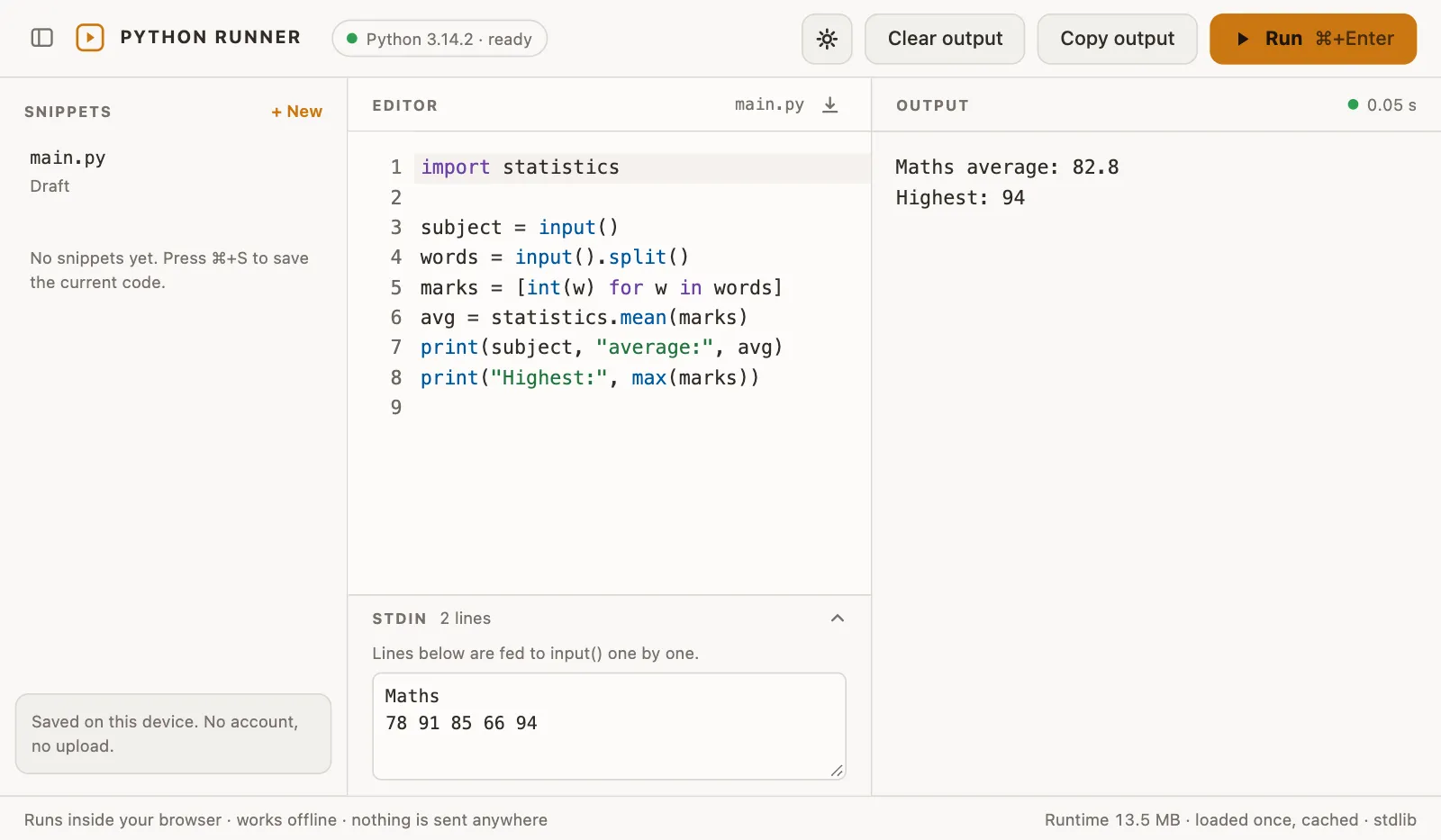
What a tool actually offers is the tool’s decision, and this is where “runs on Pyodide” needs checking. Python Runner, our Chrome extension, is a deliberate example of the ships-none case: version 1.2.1 carries CPython 3.14.2 on Pyodide 314.0.7 and nothing on top, so it is standard library only, with no pip. import numpy stops with ModuleNotFoundError, followed by the runner’s note “Only the Python standard library is available in this version.” Files a script writes are gone once the runner restarts. And input() does not prompt while the script runs: it reads the lines you typed into the Stdin field before pressing Run, and when they run out the script gets an EOFError. For short scripts that read input, compute and print, that is enough, and it all happens in the tab, with no server involved.
When your script outgrows that, because you need pip, packages beyond the ported list or files on disk, you want Python on the machine itself. Our Python on a Chromebook guide walks through the routes that give you one, with Linux or without it.
Pyodide vs PyScript
Search results mix the two names. PyScript is not another Python build: pyscript.net describes it as “an open source platform for Python in the browser”: a layer that finds the Python in a page and runs it. The interpreter underneath is supplied separately, compiled to WebAssembly.
Which one depends on the page: PyScript’s architecture docs say it “currently supports two versions of the Python interpreter that have been compiled to WASM: Pyodide and MicroPython”. MicroPython is a separate, lean interpreter with a small subset of the standard library, around 170k compressed. So a tool that says “PyScript” needs a second question: which interpreter? The limits in this guide apply when the answer is Pyodide; a MicroPython tool has its own, smaller ones.
How to tell what a Pyodide tool supports
Three checks take a minute, and none needs documentation:
- The Python version. Ask the tool, or run
import sys; sys.version. A Pyodide build is a full CPython, so the version tells you which language features you have. - The package you need. Try
import numpy, or whatever your script depends on. AModuleNotFoundErrormeans the tool did not ship or load it; ifimport micropipworks, you may be able to install pure-Python wheels yourself. - Where files go. Write a file, reload the page, read it back. If it is gone, the tool uses the default in-memory file system.
From inside a script, Pyodide names itself: sys.platform comes back as "emscripten" in any Emscripten build, and "pyodide" in sys.modules is the tighter check that Pyodide’s FAQ gives for telling Pyodide apart from the rest.
Python Runner is an independent extension and is not affiliated with the Pyodide project.