 Key Changer
- Count the semitones between the two keys, one step for each piano key or guitar fret: E to G is +3.
- Every key can be reached up or down, and the two counts add up to 12: from A, F is −4 or +8. Use the smaller count.
- Speeding a recording up raises its key and its tempo together. To change only the key, use a pitch shifter like Audacity's Change Pitch.
On this page
To change the key of a song, count the semitones from its key to the key you want. One piano key or one guitar fret is one semitone, so C to D is +2. Then shift the recording by that number with a pitch shifter, which changes the pitch but not the tempo, or move every chord by the same number. Every key can be reached two ways: from C, F is 5 semitones up or 7 down. Pick the smaller shift, because big shifts make a recording sound less natural.
Find the key the song is in now
If a chord sheet or score names the key, use it. If not, look at the key signature, the sharps or flats at the start of each line of sheet music. Open Music Theory’s minor scales chapter says it narrows the key “to two options: a major key and its relative minor”, whose tonic is three half steps lower.
To name the major key, the major scales chapter gives a rule: in sharp keys the last sharp is a half step below the tonic, and in flat keys the second-to-last flat is the tonic. So two sharps, F♯ and C♯, mean D major or B minor, and three flats, B♭, E♭ and A♭, mean E♭ major or C minor.
To choose between the two, the minor scales chapter notes that “pieces often start and end on the tonic”. With those two sharps, a song that ends on a B minor chord is likely in B minor, not D major.
Count the semitones to the new key
A semitone, or half step, is the smallest step between two notes in Western notation. On a piano, a half step up is “the key to its immediate right”, black keys included, per Open Music Theory’s half and whole steps chapter. A sharp raises a note by a half step and a flat lowers it by one, the chapter adds, so C♯ and D♭ are the same piano key.
Wikipedia’s fret article says each guitar fret is one semitone, and an octave has twelve. The twelve keys fit in one row, and after B it starts again at C:
| Semitones up from C | 0 | 1 | 2 | 3 | 4 | 5 | 6 | 7 | 8 | 9 | 10 | 11 |
|---|---|---|---|---|---|---|---|---|---|---|---|---|
| Key | C | C♯ | D | E♭ | E | F | F♯ | G | A♭ | A | B♭ | B |
Find both keys in the row and count the steps between them: to the right is up (+), to the left is down (−). C to D is +2, E to G is +3, and A to F is −4, or +8 if you count to the right and wrap past B.
Wikipedia on transposition defines it as moving every note “up or down in pitch by a constant interval”. So a minor key stays minor: A minor up 3 is C minor, not C major.
A singer can skip the key and count from the melody: if the chorus peaks two semitones above your comfortable top note, use −2.
Pick the smaller of the two shifts
An octave has twelve semitones, so the counts up and down to the same key add up to 12 and land an octave apart. From D, A is +7 or −5. Use the one closer to zero.
Big shifts cost sound quality. Audacity’s Change Pitch manual says that, as with any time-stretching effect, “some audible distortions will be expected, particularly at more extreme settings”. It gives no number for where that starts.
30 Day Singer has a 2021 lesson built on a karaoke site’s key buttons. It says you “can’t shift beyond +/- 4 semitones” there because “the audio begins to distort”, and that vocals distort even more than the instrumental. No page we read gives a general limit, so check the result by ear before settling on a big shift.
For a singer far from the original’s range, the same lesson suggests you “shift the track up and then sing in a lower octave”. A track at +5 sung an octave lower gives the same notes as −7, with a smaller shift.
Change the key of a song playing on YouTube or another site
Audacity’s manual for Change Speed and Pitch says a speed change affects “tempo, pitch and frequency content”, and that a setting of 2.000 “will double the speed (and raise the pitch by one octave)”.
One semitone is a frequency ratio of about 1.059, per UNSW’s music acoustics page. So to sound one semitone higher by speed alone, a track has to play about 5.9% faster, tempo included. Two semitones take about 12.2%.
In browsers, the default goes the other way. MDN’s preservesPitch page describes a property that browsers give every audio and video player. It is on by default (“defaulting to true”) and adjusts the pitch “to compensate for changes to the playback rate”. So a web player sped up through the browser keeps its key by default, unless the site turns that off. Changing the key there takes a pitch shifter.
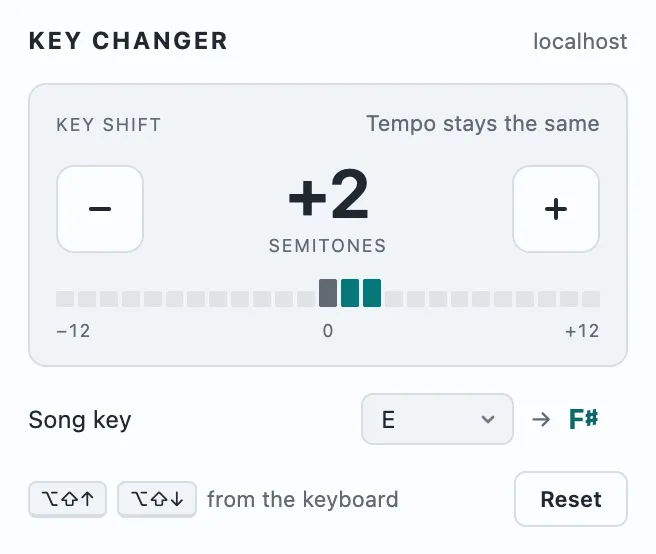
For a song that only plays on a website, with nothing to download, we make Key Changer, a Chrome extension. Click its toolbar icon and press + or − to move the key one semitone at a time, from −12 to +12. Pick the original key in its Song key list and it shows the new one: E becomes F♯ at +2. The sound is changed on your computer: nothing is uploaded, and there is no account. It needs Chrome 116 or later. Its limits: it does not find the song’s key, and it changes only the pitch, so it cannot slow a song down or speed it up. Shifts of six semitones or more can sound less natural, and the popup shows a note when you reach them. It does not work on Chrome pages or in the Chrome Web Store. Some sites play audio in a way Chrome does not let extensions change, such as protected (DRM) audio on paid streaming services. The popup says so, and if the sound drops out, it offers to reload the page. Of embedded players, it reaches only YouTube and Vimeo, after you click Allow access and accept Chrome’s prompt. It cannot change audio that another sound extension, like an equalizer, already holds. The shift resets when you reload the page, go to another site or close the tab, and it does not save a file.
Key Changer is an independent extension and is not affiliated with YouTube or Google.
Change the key of an audio file in Audacity
For an audio file you have the rights to, such as your own recording or a bought backing track, use Audacity. Select the part to change and open Effect > Pitch and Tempo > Change Pitch, the path given on the manual page quoted above. Type the shift, say −2, in the Semitones (half-steps) box: the manual says that box is for when “you do not know the key” but know the number of semitones.
If you know both keys, you can set the Pitch “from” and “to” notes instead. There are two catches. The “from” note Audacity fills in is the first pitch it detects, “not a detection” of the key, the manual says. And a “to” note in the same octave can mean up or down. In the manual’s example, A to C♯ shows 8 semitones down, and only raising the “to” octave by one makes it +4. Check the sign in the Semitones box before clicking OK.
Two neighboring effects change the tempo. Change Speed and Pitch moves key and tempo together, and Change Tempo changes the tempo “without changing its pitch”.
Play the song in the new key on guitar or piano
On an instrument, move every chord by the same number of semitones and keep its type. Find each chord’s root in the table above and count. At +2, G, D, Em and C become A, E, F♯m and D.
On guitar, a capo does the shift for you, but only upward. Wikipedia’s capo article says it shortens the strings, “hence raising the pitch”, so you can play in another key “using the same fingerings”. A capo on fret 3 with D shapes sounds three semitones higher, in F.
To go down, play the lower key’s shapes: a song in E that you want in D takes D shapes and no capo. To use easy shapes in a harder key, put the capo on the difference: for E♭, play C shapes with a capo on fret 3.